Downloading Analytics Explorer and Spotfire
To download Analytics Explorer and Spotfire:
- Open your Entitlement Management System (EMS) - Entitlement Certificate email and copy the entitlement ID (EID).
- Go to the EMS Customer Portal: https://softwarelicensing.ihsmarkit.com/ems/customerLogin.html (opens in a new window / tab).
- Ensure that EID is selected from the drop-down list.
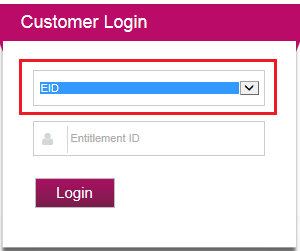
- Paste your EID (from the email) in the Entitlement Id field and click the Login button.
- Click the Downloads button to access your downloads.

If you have not already set up a network licensing system for other IHS Markit software (for example, Harmony Enterprise, Kingdom, Petra etc.), you need to set up a network licensing system. For more information, see downloading network licensing tools (opens in a new window).
If you are purchasing Spotfire in addition to Analytics Explorer, you can download the Spotfire installer and associated files (if applicable).