Select Kingdom Project
To open a Kingdom project from Spotfire, select Analytics Explorer > Kingdom > Select Kingdom Data. You will then be prompted to brrowse to the Kingdom project and enter the project database credentials.
-
Project—browse to and select the Kingdom project
*.tksfile. -
User name / Password—if the project database is SQL Server Express, you do not need to enter a user name and password. However, if the project database is full SQL Server or Oracle, you need to enter the database credentials. If you do not have this information, consult your database administrator.
-
Get Authors—click to retrieve the list of project authors.
-
Primary author—if the project has multiple authors, select the author you want to log in to the project as.
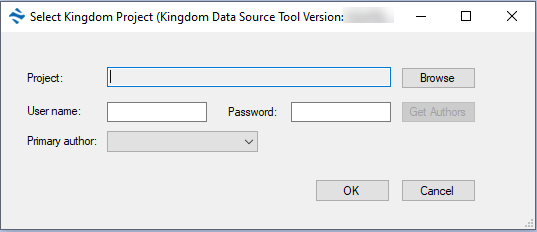
Click OK to connect to the project. The next step is to select your Kingdom project data.