|
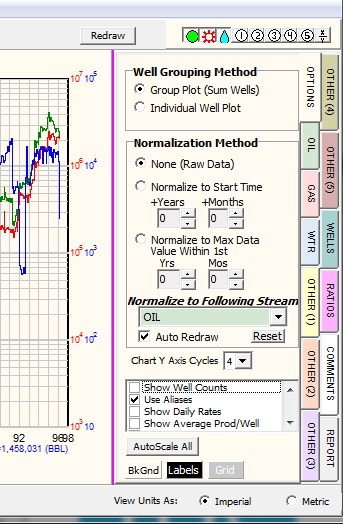
Production streams record production for a well each calendar month. Time-normalizing this data adjusts all the production streams back to a single starting point. When production is time-normalized and averaged, the plot illustrates average well or type curve production for the selected wells.
·Raw Data Production data through time without adjusting to a single starting time. Production is plotted on the Y axis against calendar year along the X axis. Raw data plotted against cumulative values shows historical production for the selected wells.
·Normalized to Start Time Adjusts each well's production to a single starting point a set number of months and years after the beginning of production. This helps to eliminate partial month production or spurious data at the beginning of a well's production stream. For example, setting this option to 2 months will set the start time for every well (0 on the X axis) after the first two months of production. A time-normalized plot shows production on the Y axis against the elapsed time along the X axis. Average production plotted against elapsed time after a single starting point gives an average well or type curve production. The cumulative values on the bottom of the production plot do not include the data truncated by time normalization, and reflect only the sum of the data after the normalized start time.
·Normalize to Max Data Value Within 1st Adjusts all production to a starting time at the maximum value of a selected production stream within a time frame. This is useful to time-normalize wells that take a variable amount of time to reach full production. As an example, if this option is selected with maximum OIL production in one year, Petra will find the month with maximum oil production within the first year and set that as the start time (0 on the X axis). Average production plotted against elapsed time after a single starting point gives an average well or type curve production. The cumulative production values at the bottom of the screen do not include the data truncated by the normalization, and reflect only the data after the maximum value.
·Auto Redraw This option automatically redraws the plot whenever any change is made. If this option is deselected, the manual redraw button is located on the upper right side of the screen.
|