|
Formation test data items such as formation pressures are not directly mappable. However, this function can be used to select important tests and copy selected attributes into the zone database. where they can be mapped. Data will be extracted for the currently selected wells, i.e., those wells listed on the main screen well list.
To open the Extract Mappable Z from Formation Test tool, select Compute>From Tests>Extract Fd Test Z Data... from the menu bar at the top of the Main Module.
Test Data tab
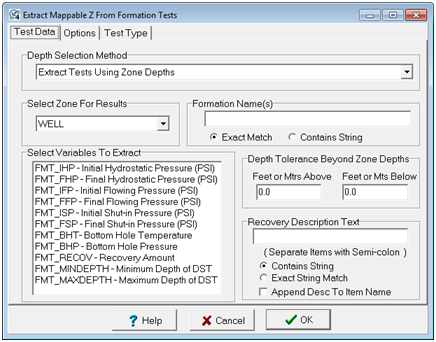
Depth Selection Method - Test records can be selected by zone depth interval or formation name.
Extract Tests Using Zone Depths - This option will look for tests within the interval definition of the zone selected on the "Select Zone For Results" list. This method depends on having a zone itnerval definition along with good coverage of formation tops. This method can be good for filtering out erroneously named tests in the database, or for tests only within a specific lithologic package.
Extract Tests Which match Formation Name - This option looks inside the tests' "FmName" entry for text set on the "Formation Name" entry. This method only uses the database entry, rather than formation tops.
Select Zone For Result
For the Zone Depths mode, this dropdown specifies the search interval and the zone that will contain the computed zone data items. For the Formation Name mode, this dropdown just specifies the location of the computed results.
Formation Name
For the Formation Name method, this entry sets the text string that Petra will look for inside the tests' FmName entries. The "Exact" option is more strict, and requires that the entry match the specified text exactly, while the "Contains String" option only requires that the test contain the text somewhere inside the database entry.
Select Variables to Extract
This section selects the specific data within the test to extract to a zone data item. This includes various volumes, pressures, and other test information. Petra will extract the value and save it to a data item in the zone selected in the "Select Zone For Results." Petra will only extract highlighted entries; left-click an entry to highlight it. Hold down CTRL to select multiple items. Note that SHIFT-click will select all items in between two successive mouse clicks.
Recovery Description Text
This section restricts the search to specific text inside the recovery entry. The "Exact" option is more strict, and requires that the entry match the specified text exactly, while the "Contains String" option only requires that the test contain the text somewhere inside the database entry.
Append Desc To Item Name - This option appends the recovery description text to the created zone item name.
Depth Tolerance Beyond Zone
By default, the Zone Depths mode limits tests to only those with at least some footage inside the zone interval. This option adds an additional buffer at a set footage beyond the exact zone intervals. For tight zone definitions, this can increase the chances of catching a test inside the zone.
Options tab
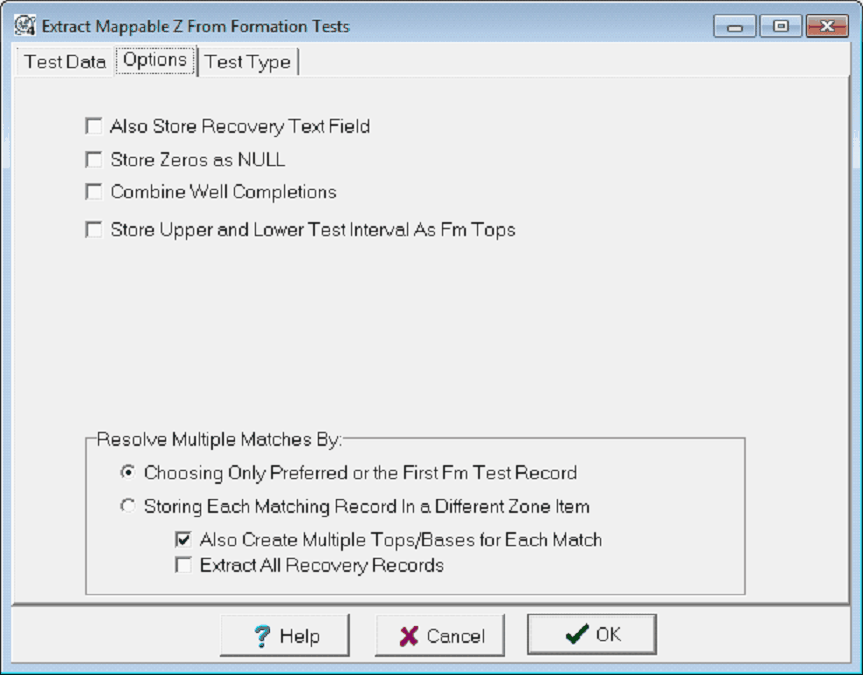
Also Store Recovery Text Field - When extracting recovery amounts, you may also store a text-type z variable with the amount, units, and description. The name of the variable is FMT_RECOV_TXT. This variable can be used for data posting instead of the Z value.
Store Zeros as NULL - By default, Petra will store zeros in the zone data item with the test entry is zero. This option replaces zeros with null values.
Combine Well Completions - By default, Petra treats multiple completions as sperate wells. This option will store test information from recompletions in the primary well's zone data item.
Store Upper and Lower Test Interval As Fm Tops - This option enables the "Formation Tops To Store Test Interval" section.
Formation Tops To Store Test Interval
This tool stores the top and base of the test interval as a formation top. Selecting a preexisting top will overwrite the values already in Petra's database. To add a new top, select the "New Tops" button.
Upper Top - This dropdown sets the formation top that will store the top of the test interval.
Lower Top - This dropdown sets the formation top that will store the top of the test interval.
Resolve Multiple Matches By
Choosing Only Preferred of the First Pd Test Record - This option will first attempt to use the tests with the "preferred" flag set. If no flags are set, then Petra will use the first production test entry.
Storing Each Matching Record In a Different Zone Item - This option stores a result for each test by creating multiple zone data items. Different zones have a "_1", "_2", and so on appended to the end.
Also Create Multiple Tops/Bases for Each Match - When the "Store Upper and Lower Test Interval As Fm Tops" option is selected, this option stores a top for each top and base by creating multiple tops items. Different tops have a "_1", "_2", and so on appended to the end.
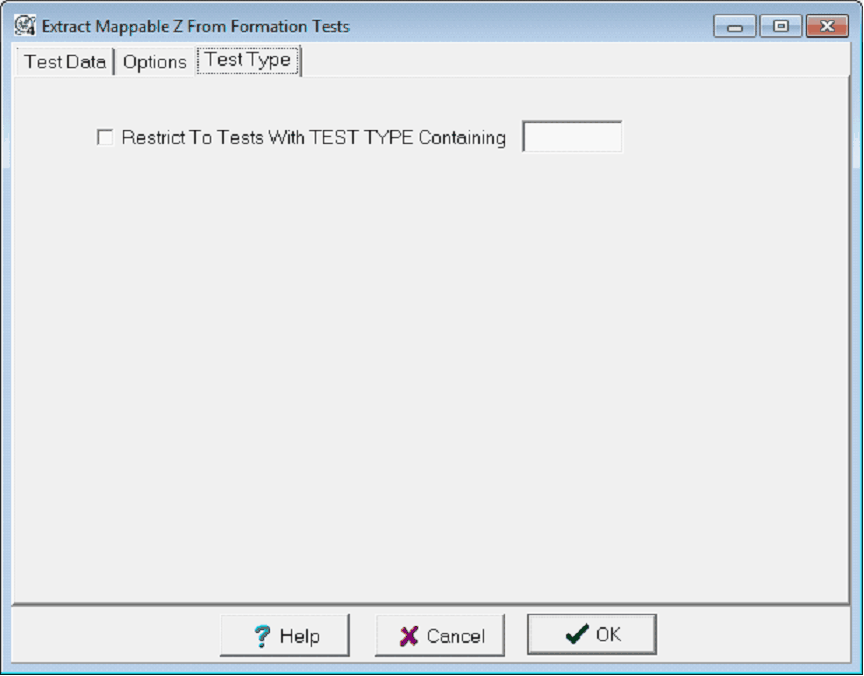
Test Type tab
This section restricts the search to specific test types.
|