Find Producing Zone |
|
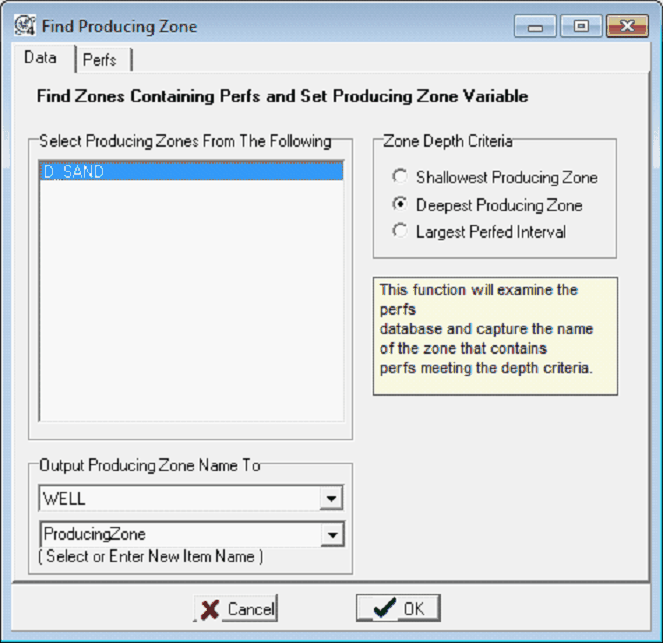
This tool uses a well's perf data to store the formation name of the "producing zone." This can be useful for quickly filtering out producing wells to a relevent formation based on user-created formation tops rather than relying on database entries. To open the Find Producing Zone tool, select Compute>From Tests>Find Producing Zones... from the menu bar at the top of the Main Module. Data tabThe Data tab sets the zones, search criteria, and output zone data items.
Select Producing Zones From the FollowingThis list contains all the zones in a project. Petra will look for perfs within the zone depth intervals, and store the zone in the selected output zone data item. Zone Depth CriteriaThis section defines how Petra selects perf intervals. Shallowest Producing Zone - When this option is selected, Petra will store the zone containing the shallowest producing zone. Deepest Producing Zone - When this option is selected, Petra will store the zone containing the deepest producing zone. Largest Perfed Interval - When this option is selected, Petra will store the zone containing the deepest producing zone. Output Producing Zone Name ToThis section sets the zone and data item that will contain the producing zone name. Perfs tabThe Perfs tab sets a few options to limit the calculation to perfs with specific types and source codes.
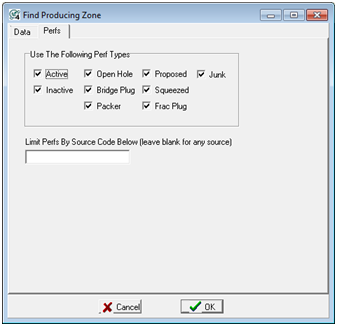
Use Following Perf TypesThe "Use Following Perf Types" tool restricts the search ton only a specific type (or types) of perfs in the database. The utility of this tool is dependant on an up-to-date database with appropriate settings. The available types include:Active Inactive Open Hole Bridge Plug Packer Proposed Squeezed Frac Plug Junk
Limit Perfs By Source Code Below - This option limits the search only to perfs with a specific user-set source code. |