|
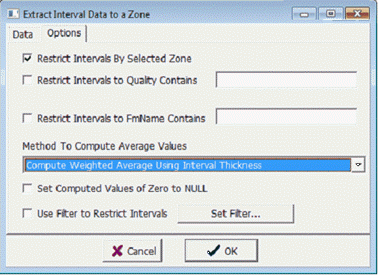
Restrict Intervals By Selected Zone
|
By default, Petra only uses intervals that intersect the selected zones definitions (where Fm tops or depths define the top and base of the zone).
Undefined zones extend from -99999 to 99999 MD, which includes every interval in the wellbore.
Deselecting Restrict Intervals By Selected Zone will not limit intervals by zone definitions.
|
|
Restrict Intervals to Quality Contains
|
limit intervals by entering quality codes
|
|
Restrict Intervals to Fm Name Contains
|
limit intervals by entering a FmName
|
|
Method to Compute Average Values
|
When computing an average value for the interval, Petra normally uses weighted averages, where thicker intervals contribute more to the average than thin intervals. Selecting Compute UnWeighted Average gives equal weight to all values regardless of interval thickness
|
|
Set Computed Values of Zero to NULL
|
The Set Computed values of zero to null sets extracted values of zero to a null value.
|
|
Use Filter to Restrict Intervals
|
Filters provide more control over which intervals are used in the zone extraction. Intervals that do not meet the filter criteria do not contribute to a zone data item. To create or modify a set of filters, select the Set Filters
button on the Filters tab.
|